
Outbound Webhooks
This page will help you get started with our outbound webhooks. You'll be up and running in a jiffy!
Two Boxes offers a number of webhooks that can be subscribed to for staying up to date on the status of a return and it's line items. By leveraging these webhooks to integrate with Two Boxes data, you can access industry leading inspection and disposition outcome details about your returns.
Events
Active
| Event Type | Description | Event_Data Schema |
|---|---|---|
| return-initiated | Emitted when Two Boxes receives an upstream webhook from the RMA Provider that a return has been created | Return Details |
| return-line-item-package-scanned | Emitted when a package is scanned into the building using the XRay app | Return Line Item Scanned |
| return-line-item-package-scanned-not-found | Emitted when a package is scanned into the building using the XRay app but no return with the tracking number is found | Return Line Item Scanned Not Found |
| return-line-item-graded | Emitted when a line in a return has completed grading | Return Line Item Details |
| return-complete | Emitted when all of the lines in a return have completed grading and the return has been closed | Return Details |
| return-line-item-ship-back | Emitted when a return line item will be shipped back | Return Line Item Ship Back |
| return-ignored | Emitted when a return is ignored | Return Details |
| return-archived | Emitted when a work capture return is archived | Return Details |
| return-line-item-archived | Emitted when a return line item on a work capture return is archived | Return Line Item Details |
| return-line-item-added | Emitted when a new line is added to a work capture return | Return Line Item Details |
| bulk-return-initated | Emitted when a bulk return created, either on the fly at the warehouse or through an integration to Two Boxes | Bulk Return Details |
| bulk-return-updated | Emitted when a bulk return is updated, either through adding/removing products in it or changing the details | Bulk Return Details |
Deprecated
| Event Type | Description | Event_Data Schema |
|---|---|---|
| return-archived-work-capture | Emitted when a work capture return is archived | Return Details |
| return-line-item-archived-work-capture | Emitted when a return line item on a work capture return is archived | Return Line Item Details |
| return-line-item-added-work-capture | Emitted when a new line is added to a work capture return | Return Line Item Details |
Specifications
URL: { defined by customer as HTTPS URL }
Method: POST
Headers
| Name | Value |
|---|---|
| content-type | application/json |
| x-two-boxes-authorization | Defined by Two Boxes as a shared token |
| x-twoboxes-signature | This is an HMAC signature that is hashed using SHA-256 with the webhook request body and a secret key set up for your webhook |
Payload
There are 3 first level fields that define the information in the webhook. Within the event_data field is all the detailed data specific to the event.
| Property | Type | Nullable | Version | Description |
|---|---|---|---|---|
| id | string | v1 | Unique message ID that can be used to track idempotency | |
| event_type | string | v1 | One of the event types listed in the "Events" table above | |
| event_data | JSON Object | v1 | Content defined based on the Event_Data schema for the event_type in the "Events" table above |
Responses
| Condition | Stats | Output Payload |
|---|---|---|
| Event Consumed | 2xx | Ignored by Two Boxes |
| Event Previously Consumed | 2xx | Ignored by Two Boxes |
| Post body not parsable JSON | 400 | Logged; Not retried |
| Caller not authenticated by API token | 401 | Logged; Retried |
| Unexpected system error | 500 | Logged; Not retried |
Implementation
Configuration
To subscribe to Two Boxes webhooks, 2 pieces of information need to be shared and configured:
- Provide Two Boxes with the url which to send the webhooks to
- Two Boxes provides the shared token to be used in x-two-boxes-authorization header
- Two Boxes provides the HMAC secret key that will be sent in the x-twoboxes-signature
Moreover, Two Boxes will:
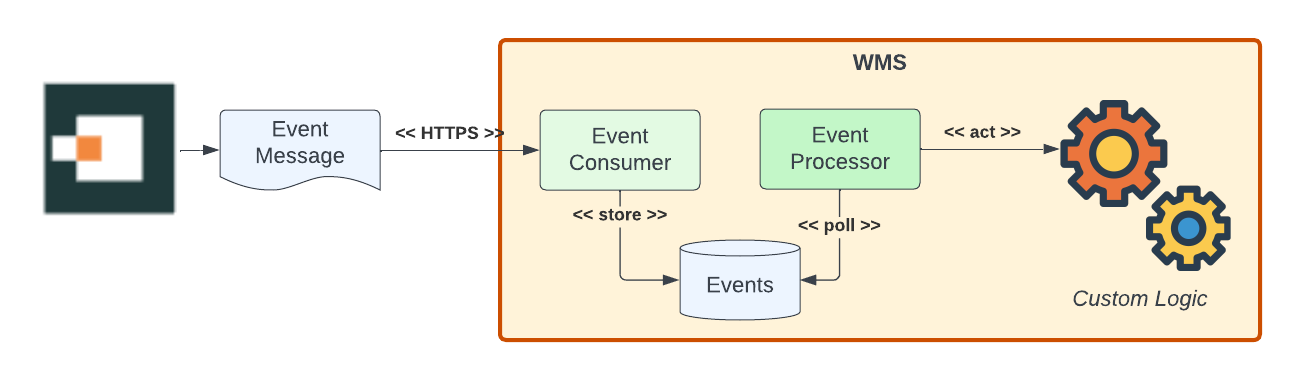
- Retry a failed webhook up to 15 times with an 2x exponential backoff delay. If system failures on the downstream webhook last longer than that, you will need to contact support to replay these events.
- Cap request response times at 15s
For these reasons, Two Boxes recommends that webhook event messages are accepted and stored on the webhook host, then processed asynchronously where additional validation and any expensive processing can take place.
System Requirements
To receive data, your system must:
- Be publicly accessible from the internet,
- Accept POST requests,
- Use SSL/TLS encryption
- Check the verification token of every request to ensure that the request is a legitimate one from Two Boxes
HMAC Hashing
If you opt to enable the hmac signature for authentication in the webhook, please note the following about Two Boxes procedure for calculating the hmac value:
- The HMAC signature value is hashed using sha256 with the webhook request body and a secret key setup for your webhook
- The json payload we use to encode is not formatted with whitespace. It has to be exactly as we send it (no tabs, spaces, pretty json formatting)
- The HMAC signature value and the request body are then base64 encoded before we send it to you. So they will need to be base64 decoded on your side.

Updated 3 days ago